

Student Association Handbook
SUO strives to enhance the student experience by effectively coordinating the collective resources of our student body.
The greatest resource our students have is their passion. The purpose of our student associations is to facilitate the discovery, pursuit, and sharing of those passions.
WE ARE RESTRUCTURING THE HANDBOOK! SORRY BUT IT WILL BE MESSY AS WE MAKE CHANGES!
PLEASE NOTE: IZZY IS ON MEDICAL LEAVE AND WILL BE RETURNING FEBRUARY 28th, 2026.
WINTER EXPO – January 21st and 22nd
Registration for both events can be found in the Student Association Events Calendar! – Winter Expo 2026 – January 21
The Membership Outreach Team works Monday – Friday 8am – 4pm, excluding statutory holidays and university closures. We will respond to emails and booking requests during this time.
The SUO reception desk in UNC 133 is open Monday – Friday 8:30am – 4:00pm (except when we close for lunch)
Membership Outreach drop-in hours are Tuesdays & Thursdays:
- Tuesdays 9:00am – 11:00am
- Thursdays 1:00pm – 3:00pm
We are committed to giving support to all student associations fairly and equally. Please help us by planning ahead! Last minute emergencies affect all student associations!
Definitions
What is a Course Union?
- The purpose of a course union is to enhance the ability of students to discover, pursue, and share their passions in a particular academic field.
- A Course Union may restrict membership to students in their particular academic field, or they may be open to all students.
- Voting members and executive members are specific to undergraduates or graduates, who major or minor in the relevant subject of the course union.
- Voting members: all students majoring or minoring within the specific academic field are automatically voting members of the relative course union.
- Course Union executives: all students majoring or minoring within the specific academic field are eligible to run for executive positions in the annual elections.
- Any student can be a general member and is welcome to attend course union meetings and events, however they cannot vote or run as a candidate if they are not a voting member.
- Examples of Course Union activities are: socializing, tutoring programs, group midterm or finals study sessions, supplying specific course materials, and/or advocating for students in their academic field.
- Many course unions will work in liaison with an academic advisor.
- Every course union is required to have a Course Union Constitution.
- We investigate complaints against any Student Association not responding to incoming students interested in a course union. It is the responsibility of the student association to keep up on emails and all inquiries.
- It is expected that course unions provide a safe space for all of their students. Discrimination on the grounds of sex, gender, sexuality, place of origin, social status, disability or age will not be tolerated. Course Unions support the diversity of our campus and the fullness of a student’s university experience that is the privilege of all students on our campus.
What is a club?
- The purpose of a club is to enhance the ability of students to discover, pursue, and share their passions and common interests outside of a particular academic field
- Club membership is open to all students
- We investigate complaints against any Student Association not responding to incoming students interested in a club. It is the responsibility of the student association to keep up on emails and all inquiries.
- It is expected that clubs provide a safe space for all of their students. Discrimination on the grounds of sex, gender, sexuality, place of origin, social status, disability or age will not be tolerated. Clubs support the diversity of our campus and the fullness of a student’s university experience that is the privilege of all students on our campus.
- The variety of types of clubs that exist is extremely diverse; from religious & ethnic clubs, to hobby & sport clubs, to clubs for social justice or affiliated with a particular political or national/international organization.
- It is up to each club to organize their executive team year to year through an election process with the members or an internal process of the existing executives replacing vacant positions with members within the club.
- The club must include at minimum the three primary executives listed above, who will work as a team to operate the club.
- These 3 primary executives will also be the 3 signing authorities for processing expenses for the club finances.
General Definitions
In this Regulation, unless the context otherwise requires:
a. “Club” means any organization ratified by the Student Union in accordance with this
Regulation, except for a Course Union;
b. “Council” means the governing body of a Course Union;
c. “Course Union” means a Department-specific organization of Members, ratified by
the Student Union in accordance with this Regulation;
d. “President” means an Executive Officer and primary contact of a Student
Association;
e. “Vice-President Finance” means an Executive Officer responsible for the finances of the Student
Association;
f. “Vice-President Events” means an Executive Officer who is the main contact for event planning;
g. “Event” is any gathering of 2 members or more for the purpose of a meeting or social
gathering in relation to the purpose of the specific Student Association;
h. “Department” means any academic field available for study at the University;
i. “Executive Member” means any duty elected or appointed governing member of a
Club or Course Union;
j. “Member” means any student who is enrolled in a UBCO degree or program and/or
has paid the Students’ Union of UBC Okanagan student fee for the current academic
year; and
k. “Student Association, per Bylaw 1, shall mean clubs or, course unions groups ratified
by the Student Union.
Quick points to know
Basics to operate
- ALL Student Associations are active each academic year from August 1 – July 31 unless you do not renew each year.
- RENEW your Student Association every year to retain active status between July 1 & the first Friday of Term 1.
- ORIENTATION – It is mandatory to attend and happens at the beginning of term 1 and term 2!
- STUDENT ASSOCIATIONS are part of the SUO and it is a separate entity from UBC.
- DO NOT use the letters “UBC” or “UBCO” in an email address, student association name, logos, domain names or social media handles before reading the detailed information about the agreement in the section below.
- FUNDING – It happens at the beginning of term 1, term 2 and a one-time funding for newly ratified student associations only!
- PRE-APPROVAL for all OFF-CAMPUS events is a MUST, no exceptions!
- PROMOTE your Student Association event on the SUO Events Calendar as well as the Student Association Events calendar in Rubric!
- POSTER PRINTING for events (20 free posters printed per event). We also have on campus printing services at paper & supply co.
- MAKE sure all executives either have access to the Student Association email address and/or Rubric Club Portal.
- STUDENT ASSOCIATION REGULATIONS – Know them or face the consequences! This is the responsibility of the entire executive team!
- EMAIL – use the Student Association email address for all communication
- ON-CAMPUS EVENTS – get the space booked first, then submit the UBCO Campus Event Form!
- DON’T MISS INFORMATION – CHECK all the email inbox folders, including Junk and Spam.
Important Contacts:
Membership Outreach Coordinator: Izzy Rusch, izzy.rusch@suo.ca
Membership Outreach Assistant: hiring for mid-August start (full-time, seasonal), membership.outreach@suo.ca
VP Internal: Shreya Patnaik, vpinternal@suo.ca
Students’ Advocate: Rachel Fortin, advocate@suo.ca
Rubric Support: support@hellorubric.com
Make one – what to know!
The Basics Of Becoming A Student Association
Any group of UBC Okanagan students can make a request to start a SUO Student Association.
Application forms for new student associations in the 2025-2026 academic year will only be accepted August 1-October 10, 2025 and January 1-February 13, 2026.
- Student Associations are part of the Students’ Union which is a separate entity from UBC. SUO student associations will have events and meetings on the campus as a part of the students’ union and are separate from the university.
- Based on a legally binding naming agreement between the SUO and UBC, student associations must always put the “SUO” acronym at the beginning of their name if they want to use the “UBCO” acronym in the same name. This pertains to all forms of communication including name, social media handles, email addresses and website domains.
- Examples of permitted usage of UBCO acronym are:
- SUO (student association name) at UBCO
- SUO (student association name) @ UBCO
- SUO (student association name) at UBC Okanagan
- SUO (student association name) @ UBC Okanagan
- Examples of permitted usage of UBCO acronym are:
Every new Student Association must be ratified at a SUO Board of Directors meeting. Being ratified as a SUO Student Association means that your group can access all resources that the SUO has available (we’ll get into what those are soon).
How do I become ratified?
- Check our Student Association Directory and ensure a similar Student Association does not already exist.
- Review the Student Association Handbook before submitting an application form to see what services are available.
- Review the Student Associations Regulations by which the student association is bound to follow, go to the Student Union Regulations at the following link. Scroll down to the Table of Contents and click on the Student Association Regulations, it will take you directly to the pertinent pages. All executives and members of the student association are required to know and follow the rules and regulations. Please refer to these regularly, as they get updated as new regulations are ratified by the Board of Directors.
- Next, fill out a Student Association Registration Form:
- The first page must provide a Student Association name, the aims and purposes, a minimum of three executive members and a general student association email address. You can have more than three executive members; however, there must be at least three (President, VP Finance, VP Events).
- Personal emails cannot be used for a Student Association. There must be an email address designated to the student association that can be passed on to future executives.
- Working with a faculty advisor is optional.
- The second page is the names and signatures of the three signing authorities (President, VP Finance, 3rd executive of choosing). Your signing authorities will oversee and approve the spending of student association funds and must also be executive members. There must be no more or less than three signing authorities.
- Pages 3 and 4 are for sharing the required minimum of 32 general members to be able to submit an application to create the student association.
- If the application is successful and the potential student association is ratified by the SUO Board of Directors, you will have the ability to create a membership in the Rubric club portal after it is affiliated with the SUO.
- Create a student association portal on our Rubric online platform using the primary email address for the student association. Do not use personal emails, we will never ever affiliate association accounts created with personal emails.
- Complete the online registration form (Forms tab/Affiliation Processes) which includes uploading a pdf of the completed Student Association Registration Form.
- Please note: The online registration form will only be available during the periods that we accept registration forms, however you can fill out the SA Registration Form and have it ready to upload as a pdf before the specified time period.
- The potential executives and members may want to create personal student accounts on Rubric as well, using their personal email addresses.
- If the student association is ratified, the executives will be able to access the SA portal from their personal account when it is affiliated with the SUO.
Once a Student Association Registration Form has been submitted within our online Rubric platform and reviewed to be complete without error, the Membership Outreach team will send an email letting you know that the application has been accepted. We will not submit the application to the VP Internal for processing until the application has been accepted.
Once the application is completed without error and accepted it will be reviewed by the VP Internal and Membership Outreach Coordinator. If we have questions, we will reach out via the Student Association email address specified on the form. If necessary or requested, the executives named on the form may be invited to attend a meeting with the VP Internal or do a presentation to the SUO Board at a Board of Directors meeting. The application may be denied if it is a duplicate of any existing Student Association, it does not have a clearly defined purpose or it cannot operate within the Student Union Regulations.
- Student Association means any organization ratified by the Students’ Union in accordance with SUO Student Association Regulations and is open to all SUO members.
- A club is a student association that is based on common general interests and open to all current student union members.
- A Course Union is a Student Association that is Department or Faculty specific and open to members only specific to that Department or Faculty, ratified by the Students’ Union in accordance with SUO Student Association Regulations. Any student is welcome to be a member of a course union, however voting members are undergraduates or graduates, who major or minor in the relevant subject of the course union. Course Unions must have Annual General Meetings and Annual Elections to vote in the Executive Board of the Course Union. There is usually a faculty advisor working in partnership with the course union.
For every Student Associations you will need:
- Three executive members, President, Vice President Finance and Vice President Events (see definitions in the Student Association Regulations).
- Three signing authorities (President, VP Finance and 3rd executive of the team’s choosing).
- Your signing authorities are the executive members of your student association who oversee and approve the spending of your student associations funds. While you may have more than three executive members, you may only have three signing authorities and they must also be executive members. Based on Student Association Regulations, the President and Vice President Finance must be listed as signing authorities. We do not accept computer font or adobe signatures on page 2 of your registration form (your list of signing authorities). Signatures must be hand created and full signatures, initials only will not be accepted.
- Thirty-two regular members, all executives and members must be students currently registered in classes, attending UBCO & paying student fees to the Student’s Union.
- A general student association email address.
- Course Union only – A constitution that outlines the mandate and operations is required for each course union. A new potential course union can submit a registration form and wait to be ratified before creating a constitution. The executives of the course union would need to create a constitution during the first year of operation, if ratified. Here’s an example constitution.
Most importantly, student associations must be open to all current UBC Okanagan students (all undergraduate and graduate students at UBC Okanagan) and must not duplicate the function of a pre-existing group. Course unions do differ in that some students would be voting and non-voting members based on the membership in the constitution in alignment with our student association regulations.
Contact the SUO VP Internal or Membership Outreach Coordinator if you have any further questions or concerns.
Check the student association email for updates. We will email this address to connect and ask questions. This is where you will get notice of your ratification status and whether the application is passed or denied. If the application is approved and the student association is ratified by the SUO Board of Directors, the email will included information on how to get started. You will also be guided to submit a funding application for new student associations only in the Rubric club portal for up to $500. You will have 10 days from the date of receiving the successful ratification email to submit the funding form. If you miss the deadline, you will have to wait until the Term 1 or Term 2 funding periods to apply for funding. If you miss the opportunity to apply for the new student association funding, you will only be eligible to apply for the maximum amount of $500 until you provide a Student Association End of Term Report providing information on past events and fiscal responsibility.
Renew it or lose it!
THE BASICS OF RENEWING EACH ACADEMIC YEAR
How does my club or course union renew for the 2025-2026 academic year? All student associations must renew every academic year starting July 1 to the deadline of 11:59pm Friday September 5, 2025 (1st Friday of the term).
Important points to know before renewing
Student associations are active each year until July 31. After August 1st, Student Associations do not have access to SUO student association services and support until they submit their Student Association Renewal Form and renewal is confirmed by the Membership Outreach Coordinator.
If the September renewal deadline is missed, Student Associations do not have access to SUO services and funding for the first Winter term. A Student Association which does not meet the first Winter term deadline may access student association services from the Students’ Union for the second Winter term if they submit their renewal form after the end of Term 1 and prior to the first Friday of the second Winter term as per the Student Association Regulations.
- Student Associations are part of the SUO that is a separate entity from UBC. The club or course union will have events and meetings on the campus but is not an entity within the university.
- Each student association must have a minimum of three executive members, President, Vice President Finance and Vice President Events (see definitions in the Student Association Regulations) and 32 general members.
- Course unions ratified before April 2023 are required to have a minimum of 3 executives and 15 members.
- Three signing authorities (President, VP Finance and 3rd executive of the team’s choosing if you have more than 3 executives).
- Your signing authorities are the executive members of your student association who oversee and approve the spending of your student associations funds. While you may have more than three executive members, you may only have three signing authorities and they must also be executive members.
- Based on Student Association Regulations, the President and Vice President Finance must be listed as signing authorities.
- The 3rd signing authority can be any executive position as long as they are listed in the Society Exec Team in the portal in Rubric.
- Don’t forget that a student can be a signing authority for only one student association.
- We do not accept computer font or adobe signatures on page 2 of your registration form (your list of signing authorities).
- Signatures must be hand created and full signatures, initials only will not be accepted.
- The Membership Outreach Coordinator and Finance Manager to effectively verify the signing authorities for processing expense reimbursements and/or equipment agreement forms to the specific student association.
- Thirty-two general members who must be students currently registered in classes, attending UBCO & paying student fees to the Student’s Union.
- All information must be legible.
- Based on a legally binding naming agreement between the SUO and UBC, student associations must always put the “SUO” acronym at the beginning of their name if they want to use the “UBCO” acronym in the same name. This pertains to all forms of communication including name, social media handles, email addresses and website domains.
- Examples of permitted usage of UBCO acronym are:
- SUO (student association name) at UBCO
- SUO (student association name) @ UBCO
- SUO (student association name) at UBC Okanagan
- SUO (student association name) @ UBC Okanagan
STEP 1
- Fill out a Student Association Renewal Form:
- Page 1 must provide a Student Association name, the aims and purposes, a minimum of three executive members and a general student association email address. You can have more than three executive members; however, the minimum is 3 (President, VP Finance, VP Events).
- Personal emails cannot be used for a Student Association.
- Working with a faculty advisor is optional.
- Page 2 is to provide the names and signatures of the three signing authorities (President, VP Finance, 3rd executive of choosing). Your signing authorities will oversee and approve the spending of student association funds and must also be executive members. There must be no more or less than three signing authorities.
STEP 2
- First things first, make sure you have access to the specific email address for the club or course union
- Log into the club portal on our Rubric online platform. As long as you have access to the email address, you will be able to access it by clicking on “Forgot Password” to reset it.
- Please note: You must use the portal associated to the primary student association email address, it cannot be a personal email address or the application will be not be processed.
- Fill out the online Annual Renewal/Affiliation Form found under Forms/Affiliation Process and upload a pdf of the completed Student Association Renewal Form as part of the process.
Step 3
- Update the Exec Team under the profile setting to match the executives listed on the renewal form plus any other executives who will need access to the club portal.
- The executives will want to create personal student accounts on Rubric as well, using their personal email addresses.
- Once an executive has been added to the exec team and has created a student account, they will be able to access the club portal from their personal account under the Profiles tab.
- The roles in the exec team can be set up to only give access to the necessary sections of the club portal. The president and VP Finance need access to the Settlements but a social media coordinator would not.
- I would recommend that only 1-3 of the primary executives have access to the Society Settings to make changes to the exec team.
- Any executive who would be submitting requests for borrowing equipment or submitting event set up work orders would need access to the Forms.
Step 4
AFTER the renewal forms have been submitted and approved by Membership Outreach in Rubric:
For every Student Association you will need:
- A minimum of thirty-two general members to sign up for a membership in Rubric.
- There must be a membership for the current academic year for general members to join.
- The custom dates for the annual membership are August 1 to the following July 31.
- As long as the renewal form has been submitted in the renewal/affiliation form in Rubric and approved, the start date of the membership can be changed to a date no earlier than July 1 for the members to join.
- The membership can be set up as free or with a membership fee.
- The link for the membership can be shared on social media for members to join.
- Student associations that have not submitted the renewal form in Rubric and do not have a minimum of 32 general members before 11:59PM September 5, 2025 will lose their affiliation standing in Rubric.
- The next opportunity to renew the student association would be the first week of Term 2 (deadline 11:59PM January 9, 2026)
Contact the SUO VP Internal or Membership Outreach Coordinator if you have any further questions or concerns.
Check the student association email for updates. We will email this address to connect and ask questions.
At any point during the year, if you have a change in executive or signing authority, contact the Membership Outreach Coordinator by email or during posted drop-in office hours.
Can ratification be lost?
- Student Associations will be dissolved after remaining inactive for over 6 months. If the student association is not renewed in Term 1, it must renew before the deadline in Term 2 or a Registration Form will need to be submitted and ratified to start up as a new student association.
- If members of the Student Association do something that violates the UBC Student Code of Conduct, such as but not limited to misconduct against persons, misconduct involving property, disruption, and unauthorized use of university facilities, equipment or services.
- If a violation of the Student Associations Regulations occurs.
- If a Student Association opens an external bank account or operate financially using external sources, including cash transactions and e-transfers.
- If a Student Association opens an online account that deposits into an external account.
Rubric – IT for functioning
-
Rubric How To Presentation (including videos)
-
Rubric Clubs Help Centre
-
Student Help Centre
-
If you have issues that are not solved in the club or student help centre above, email support@hellorubric.com
Getting Started: How to Set Up Your Club Portal
- To start using Rubric and all of the things it offers, you need to create a student association account.
- Use the primary student association email address to create the account (the one you have registered with Membership Outreach), not your personal email!
- Make sure that your campus is the University of British Columbia Okanagan SUO of UBC.
- To make a member account, please use your personal email address that was listed on the Student Association Registration or Renewal Form.
- DO NOT make a club portal account using your personal email address!
- We will not accept any forms submitted for a non-affiliated portal.
- You cannot create events for ticket sales on a non-affiliated portal.
- Please note: The entire executive team will also need to create student accounts using the personal email addresses. You can create different roles and each role can have access to different aspects of the club portal. Everyone should have access to the forms.
- Once a member is listed as an executive, they can access the club portal from their personal account under the profile icon. This way, the team does not need to share the password for the club portal to get access to fill out forms or create events.
Things you can do with the portal
- Create free memberships for students to join
- Charge a membership fee to help raise funds for events and projects. Annual memberships must expire on July 31 each year to follow SUO SA regulations
- Course unions could create multiple types of memberships for voting members and non-voting members (see SA Regulations for more information)
- Customize the membership card with a logo and graphic design
- Link club special deals with local businesses to the membership
- Share a link for the annual membership on your social media to make it easy for students to join and get involved
- Communicate by email and/or SMS messages to all your members
- Sell merchandise such as tshirts, hoodies or stickers to fundraise for events and projects
- Please note: Merchandise sales can only be used to fundraise for future events. You cannot sell merchandise for the purpose of profit that would require charging PST and GST. We are a non-profit and must operate as such.
- Create events to promote on the event on campus and in the Student Association Events calendar
- Sell event tickets online and scan tickets at the door
- Promote your student association with write ups and links to social media in Link in Bio tab
- Submit forms to the SUO for renewing each year, funding, end of term reports and borrowing event equipment – no more paper copies and the forms are stored in Club Files for your records.
- Students can submit ratings of the club/course union and events to interact with each other
- All executives can access the student association portal from their personal student account by being added to the Society Exec Team
EVENT PLANNING
STEP 1 – Where & when
DO’S
- CHECK ACADEMIC ROOM AVAILABILITY BEFORE SUBMITTING A FORM. Rooms are booked on a first come, first serve basis. Sometimes it will show that a room is available when it is not because a previously submitted request has not been confirmed yet. We request first, second and third choices of rooms in the booking form in case this happens.
- SUBMIT YOUR SAFE PLANNING CAMPUS EVENT PLAN to CORM (Campus Operations & Risk Management).
- Every event must be submitted to CORM using this form!
- Do not submit the form until you have the room booking confirmed for the specific date and time to include in the form.
- If your event is a simple one, you just need to inform them by submitting the qualtrics form.
- If the event is a larger event or involves risk, you will need approval for the event from the committee.
- Make sure you plan your event with time to submit the form and get it approved.
- Events that require approval will be canceled if confirmation of approval cannot be provided at least 48 hours before the event.
- NEED EVENT SET UP – Complete the Campus Event Set-up Work Order Form on Rubric.
- Don’t forget to include a map or diagram of how to set up the room.
- What do you need?
- Make sure you submit the form including a map or diagram of set up at least 21 days before your event!
- This is important so facilities can schedule the work or it may not happen!
- BE PATIENT AND RESPECTFUL – We have many requests to process and university procedures to follow
- WHEN MAKING MULTIPLE ROOM BOOKINGS for the same day, you can specify the multiple rooms wanted in the Enter a description for the indoor/outdoor space of the booking form as long as the dates and times are identical.
- RECURRING BOOKING REQUESTS – Make sure your start date and end date are the first and last days of the recurring events.
- If the event is weekly, the start date is the first date that you want the weekly sessions to start.
- The end date is the last day that the sequence of events will happen.
- We need to know if the sequence of events is for 6 weeks or 12 weeks by filling out an end date different than the start date.
- NON-ACADEMIC SPACES such as foyers, outdoor spaces and the UNC 200 Ballroom availability are not viewable on any timetables on the UBC website.
- Please submit booking requests in our system with your preferred request.
- It would be helpful to include options for times and dates in case the space is not available for the time you prefer.
- We will reach out with some options if we cannot book the space as requested.
- GIVE CLEAR DETAILS so we can process the request quickly.
- PUT ROOMS BACK THE WAY YOU FOUND THEM. The last thing we want is a professor finding a messy classroom the following morning before a lecture or midterm.

DONT’S
- Submit a form for academic spaces before checking room availability (UBC CWL authentication now required on-campus, or use UBC VPN)
- Book the following rooms
- RESTRICTED CLASSROOMS
- TEACHING LABS
- COMPUTER LABS
- CLASSROOMS THAT AREN’T LISTED ON CENTRAL BOOKING
- Submit requests specific only to a building and not a room. Check availability and specify the specific rooms wanted on the form.
- Book a space last minute, we do our best but can’t make miracles happen
- Forget to submit your Safe Planning Campus Event Plan to CORM. Every event needs to submit a form either to inform or for approval.
- Have an event in a private residence or home. Our insurance does not cover liability in these spaces.
- Do not have an off-campus event without pre-approval. Expenses for unsanctioned SUO off-campus events will be denied payout.
Booking Academic Space?
BOOKING PRIVILEGES
Campus Classroom Bookings
For room booking requests (eg. club meeting in a classroom) please allow 3-5 business days minimum for a booking confirmation. During our busy times (September and January) allow at least 5-7 business days to process booking requests. Keep in mind that our office hours are Monday – Friday 8:00am – 4:00pm and we are closed during all university closures. If you submit a booking request on a Friday night, we don’t see it for processing until Monday morning.
For larger events, make sure to request your booking well in advance, the recommendation is 30 days. It will take at least two weeks for a safe event plan to be reviewed and approved by CORM (they only meet once a week to review submissions). Campus Event Set-up Work Order Forms must be submitted in Rubric 21 days before the event to approve the workorder and schedule the staff to do it!
We send booking confirmations to the Student Association email address as soon as we can after receiving them from the Central Booking Office.
The Central Booking Office (CBO) provides an online timetable (UBC CWL authentication now required on-campus, or use UBC VPN) to show availability of academic spaces. Please confirm availability BEFORE you submit the booking request and make sure that you include extra time for event set up and clean up in the availability, if needed. It is important that you include the details of what you need. We need to know the specific start and end times of the event. Are you going to need facilities to set up tables and chairs? They will need at least 2 hours before the start of the event to go in and do set up. If you event starts at 5:00pm and you need set up, the room availability needs to start at 3:00pm. Let us know!
If the room you want is a classroom space and it is not listed on the online timetable, it is not available for student association events. For example, the timetable only shows one bookable room in the CCS building. The other classrooms are not available.
You must have received the confirmation email for the booking request before submitting the Campus Event Form. CORM needs to know exactly where the event is happening!
Check out the different spaces available:
Step 1: Verify room availability (UBC CWL authentication now required on-campus, or use UBC VPN)
How to use the timetable:
- Click on “Rooms”
- Select the room you would like to check for availability
- Select the “Week Range” (all weeks start with the Monday date)
- Select the day of the week your event/meeting will take place
- Select the “All Day” option to see the full schedule for the date selected
- Leave the default “Single (Basic) Timetable” option
- Click “View Timetable”
If you have an ad blocker installed on your computer, the timetable will not display (you will need to disable your ad blocker for the timetable website).
Step 2: Complete Room Booking Request Form
PLEASE NOTE: times and locations of classes and events on the timetable can be subject to change. The timetable reflects updates to the timetable in real time. Not all locations are available to be viewed in the “Room” search; only listed locations are available for Student Association bookings. Computer labs and teaching labs are unavailable for student association events.
UBCO Booking Timelines
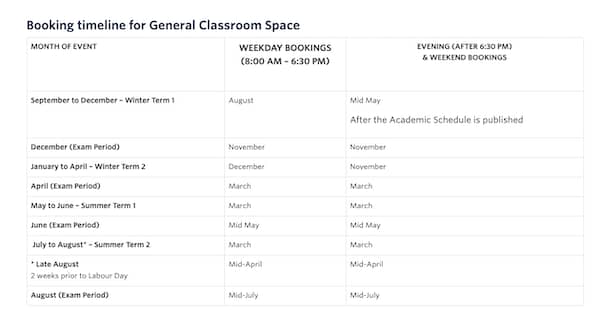
Non-academic spaces we book for you
Ballroom (UNC 200)
- Capacity for 136 seated banquet-style or 200 standing or seated theatre-style
- Built-in screen, overhead projector, microphone and surround sound system
- Must be booked at least 2 hours in advance of event start time for event table set-up and/or decorating
- Event set up such as tables, chairs, podium and dividers must be done by Facilities Management. Requests must be submitted 21 days in advance of event date via the Campus Event Set Up Work Order Form in the Rubric portal.
- 5 microphones available by request (include your request on the Student Association Event Set Up Facilities Work Order Form under Sound Requirements section)
- If music and dancing is part of the event, SOCAN and Re-Sound fees apply. These fees will be paid from your student association account after your event
UNC 200 Requirements:
- Must be booked for at least 2 hours before and after specific event times for set-up and clean up
- A Safe Planning Campus Event Form must be submitted to CORM at least 30 days in advance
- A Campus Event Set-up Work Order Form is mandatory for the UNC Ballroom. The completed form including a map or drawing of the requested set up must be submitted in Rubric a minimum of 21 days in advance of the event date. Due to liability no one other than the facilities department can have access to the storage room. If you want a specific set up for your event, you must use the staff of the facilities department and be charged for the cost of their services.
- If the event is on an evening or weekend, you can request a salto key for access by filling out the Salto Request Form on Rubric. This form can also be used to request access to the elevator in the UNC for accessibility during the hours of the event plus 30 minutes before and after the start/end times.
Foyers
There are foyers in many buildings of different sizes for different uses.
- ADM Foyer – To book this foyer, you must also request dividers or Pipe & Drape to be placed in front of offices with glass walls for the occupant’s privacy by emailing a facilities work order form to the Membership Outreach Coordinator.
- ARTS Foyer – available
- ASC Foyer – available
- COMMONS Foyer (COM 101) – This foyer is bookable for student associations and university departments, however the calendar showing availability is not viewable to students. Submit a booking request for the date and time preferred and we will get back to you with options if the desired date and time are not available. This space is booked on a first come, first serve basis however SUO/student association bookings take priority over other departments.
- EME Foyer – This space is 2 levels and can be used for larger events. The two levels cannot be booked separately. A Campus Event Set Up Work Order Form (found in Rubric club portal) is required for a large event in this area. The completed form and a drawing of the requested set up must be emailed to Membership Outreach Coordinator a minimum of 21 days in advance of the event date (event set up and clean up must be organized by Facilities Management)
- FIPKE foyer – Not available. It has permanent study pods for students so tabling and events are not allowed
- SCI Foyer – This foyer is small but can be used to set up a single table, if needed
- UNC Foyer – There are two spots (100 & 100A) that can be booked between the doors and stairs of the UNC foyer for tabling. Each spot includes two tables and two chairs to promote events, sell tickets or sell treats. UNC 100 is the two tables closest to the exit doors. UNC 100A is the two tables closest to the stairs.
UNC 334
This boardroom has the capacity for 27 people and is mainly used for students to present their thesis. It is available to book, however your booking could be cancelled 2 weeks before the booked date for a thesis presentation. You would most likely always get a 2-week notice if the booking needed to be cancelled. It has a lectern and a 48″ x 96″ whiteboard.

UNC 334 is a non-academic space so the calendar of availability is not viewable to students. When submitting a booking request, choose Academic Space/Classroom and enter UNC 334 for the room code. We will reach out with alternate options if the date/time requested is not available.
Outdoor Spaces
Outdoor space can be booked using our regular room booking system.
Outdoor spaces do not come with tables, chairs, or other equipment set up. If tables/chairs are required, submit a Campus Event Set Up Work Order Form in the Rubric portal after you have received a booking confirmation email. All Facilities Management requests must be submitted twenty-one days in advance of your event date. Facilities Management charges $40 per crew member per hour for event set-up and tear down.
There are a few tables, chairs, extension cords and branded tablecloths that your student association can borrow. We even have a 10′ x 10′ tent and a pop-up banner! Most of these items cannot be lent out overnight or over weekends. For evening and weekend events you need to submit a Campus Event Set Up Work Order Form for tables and chairs. Extension cords can be borrowed overnight and weekends on a first come first serve basis. The form can be found in the Rubric portal.
Contact Membership Outreach for more details, or feel free to request an item in your event booking form.
Booking the non-academic spaces listed above
Non-academic spaces booked through the SUO Booking System
Unfortunately, foyer spaces, outdoor spaces and the UNC 200 Ballroom availability are not viewable on any timetables on the UBC website. Please submit booking requests in our system with your preferred request. It would be helpful to include options for times and dates in case the space is not available for the time you prefer. We will reach out with some options if we cannot book the space as requested.
Examples of suggestions would be:
- If the room is available an hour or two later, we would like to book it.
- If the space is not available for the date requested, we would like it any day over the same weekend or the following Friday.
BOOKING PROCEDURES
Submitting Booking Requests
Step 1: Complete Room Booking Request Form
For room booking requests please allow a minimum of 3-5 business days for a booking confirmation. During our busy times (September and January) allow at least 5-7 business days to process booking requests. Keep in mind that our office hours are Monday – Friday 8:00am – 4:00pm and we are closed during all university closures. If you submit a booking request on a Friday night, we don’t see it for processing until Monday morning.
For larger events, make sure to request your booking well in advance, the recommendation is 30 days. It will take at least two weeks for a safe event plan to be reviewed and approved by CORM (they only meet once a week to review submissions). Campus Event Set-up Work Order Forms must be submitted in Rubric 21 days before the event to approve the workorder and schedule the staff to do it!
We will send booking confirmations to the Student Association email address once the booking is confirmed in the UBCO system.
Non-academic spaces not booked by MOC
ADM 026
Currently ADM 026 is not available for events without an FCCS sponsor. We are working on this with UBC. If you have any questions, email Membership Outreach. We will update this information as we learn more.
Arts Atrium
The Arts Atrium is not available for events.
Campus Recreation
Gymnasium, Volleyball Courts, Nonis Field, Ball hockey rink, etc…
> Campus Recreation
Campus Study Space
https://library.ok.ubc.ca/spaces/book-study-space/
Collegia Spaces
Each collegia is associated with a particular theme; however, all students are welcome to access whichever space they find most suitable. Each collegium is outfitted with similar amenities and furniture. Try them all to find out which space works best for you!
Global Collegium – EME 0252
First and Second Year Collegium – UNC 336
Upper Levels Collegium – UNC 335
Please take note of the Hours of Operation below. If your event is not during these hours, you will need to book a classroom for your event.
Regular hours of operation
Until December 5: Monday to Thursday 8:30 am to 6 pm | Friday 8:30 am to 4:30 pm
Note: All Collegia spaces are closed on weekends and statutory holidays
For booking Collegia spaces at UBCO, contact the Student Experience Office at studentexperience.ok@ubc.
COM104 Sawchuk Family Theatre
Located on level one of the Commons, the Engagement Theatre is a 25-30 person public and bookable space that gives users access to a 16 screen video wall.
Technology
- 9′ tall x 16′ long video wall
- Multi-source inputs: HDMI x2, Air Media, VGA, HD Cable x3
- User-friendly touch interface controls
- Stereo sound system
- Dual wireless microphone
> Booking form and more details
Nechako Gathering Room
The Nechako Gathering Room is not available for booking Student Association events.
THE WELL PUB
The Well is a great place to throw an event. All ages events in the Well do have some fees attached to it, however the needs of the event affect the costs involved. Due to no alcohol being sold there is usually a staffing fee as well as an overall booking fee. This fee is arranged between The Well Pub Manager and the folks putting on the event.
For the most part a 19+ event would not have any fees attached to it as bar sales would cover the costs.
Since the event is in Students’ Union space, there are no extra insurance costs or waivers to sign for All Ages and 19+ events.
If someone wants to inquire about booking the space, they can contact The Well Pub Manager.
UNC 105 Boardroom
The Students’ Union UNC 105 Boardroom contains the following equipment:
- Large TV Screens (2 x 86″ displays) with cameras for room participants
If hybrid/virtual meeting – 1 screen for remote participants and 1 for presentation
If in-person only meeting – 2 screens for presentation (mirrored) - UBCO Classroom standard wireless presentation system – Crestron AirMedia (wireless OR physical USB-C button)
- Ceiling-tile room speakers
- Ceiling microphones
- Camera for presenter to be seen on a virtual meeting
- Wireless access point
- Small sink
- Twenty (20) chairs
- Six (6) rectangular tables
- Small sink and snack bar
PLEASE NOTE: Breach of any terms and conditions may result in the fee.
UNC 106 Theatre
The Students’ Union UNC 106 Theatre contains the following features/equipment:
- 88 theatre-style seats
- Ceiling-mounted 4K HD Projector
- Wall mounted touch-screen control panel
- UBCO Classroom standard wireless presentation system – Crestron AirMedia (wireless OR physical USB-C button)
- 2 hand-held microphones
- 1 lapel microphone with clip
- Surround Sound Speakers (media must be created for surround sound playback)
spatial audio and Dolby Atmos supported - Two wireless access points
- Apple TV
- Blu-ray DVD player
PLEASE NOTE: Breach of any terms and conditions may result in the fee.
STEP 2 – tell UBCO what is happening & get approval if needed
All on campus events must be reported to Campus Operations by submitting a CORM Safe Planning Campus Event Form.
Campus Operations is a committee of different staff from a variety of departments within UBCO who are involved with many factors of events such as facilities, security, food services and custodial services. We, the staff of the SUO are not part of the committee, it is university based.
Forms must be submitted a minimum of 21 days before the event, however it can take up to 30 days or more if it is a larger event, has risks involved or includes alcohol. The volume of submissions at the beginning and end of terms can also affect the time it takes to get approval.
Do not submit the form until you have the room booking confirmed for the specific date and time. CORM needs to know the exact room that the event will happen in.
If your event is a simple one, the application is a way to inform them of your plans.
LARGE EVENTS
If the event is a larger event or involves more details, you will need approval for the event from the committee. Make sure you plan your event with time to submit the form and get it approved. The committee only meets once a week and due to the volume of events on campus, approval can take time especially at the beginning and end of each term.
Larger events require a request well in advance – four weeks for an event without alcohol served and six weeks if you are planning to serve alcohol. Liquor licenses are acquired through Campus Security (see Safe Event Application Form below). If you will be hosting a large event on campus, follow these steps:
- Submit a room booking request with the on-campus event form
- Receive confirmation of your booking request before submitting a Campus Event Form
- Submit a Campus Event Form to CORM at least 30 days in advance.
- If CORM requires a security guard to be at your event, campus security will schedule the guard. You will be charged $40/hour for a minimum of a 4 hour shift for each security guard required. This rate may change based on changes from the security company.
- Security charges will be paid from your student association funds by the SUO after your event. You do not need to submit expense reimbursement forms to pay these university department charges.
- Point of Information: The success or failure of your event will affect future events for your student association. CORM may make decisions for your event based on the past occurrences, including damage or not following security requirements.
Events that require approval may be canceled if confirmation of approval cannot be provided at least 48 hours before the event.
STEP 3 – Does your event require set up?
Simple set up
The event is simple and happening during the hours of Monday – Friday 8:00am to 4:00pm
Membership Outreach has a few items that can be borrowed during office hours
6′-fold-up tables (maximum of 2 available for the event)
fold-up chairs (maximum of 2 available for the event)
Event set up for greater needs, including evenings and weekends
- Submit a Campus Event Set-up Work Order Form for requested event set up. This form is mandatory for all events in the UNC Ballroom. The completed form including a map or drawing of the requested set up must be submitted in Rubric a minimum of 21 days in advance of the event date. Due to liability no one other than the facilities department can have access to the storage room. If you want a specific set up for your event, you must use the staff of the facilities department and be charged for the cost of their services.
- Facilities Management charges $72 per crew member per hour for set-up and tear down of events.
- Facility department charges will be paid from your student association funds by the SUO after your event. You do not need to submit expense reimbursement forms to pay these university department charges.
SUO equipment student associations can borrow or rent
CASH BOXES
paper & supply co has a limited number of cash boxes which can be signed out by Student Association members on a first come, first served basis. If you require a cash float, you must make your request a minimum of two (2) business days in advance. Please include your request for the quantities of bills and coin required to a maximum of $200.
Visit or contact the paper & supply co at UNC 103 for more information or to make a request. You can also email the paper & supply co!
MONERIS DEBIT MACHINES
The SUO has four (4) Moneris debit/credit machines for Student Association use. The SUO covers the monthly rental cost of the machines. The Student Association will be charged the transaction fees only when they borrow the machine to collect funds.
- To request a debit machine, please fill out our Moneris Machine Request Form found in the add-ons when submitting On-Campus Event or Off-Campus Event forms.
- These machines are booked on a first come, first serve basis and cannot be removed from campus.
- A Student Association may only book one machine at a time to a maximum of 7 days.
- Moneris bookings cannot be reserved consecutively.
- You will receive an email letting you know the machine is available or not on the dates requested.
- Once you have received confirmation, you will need to complete the Moneris POS Machine Request Form in your Rubric club portal.
- We will confirm the signing authority signatures and approve the form.
- You will receive confirmation through the club portal.
- Please have the person responsible for the machine provide their student ID card when they come to pick-up the machine from the SUO Front Desk.
- Debit machines not returned before 4:00PM on the final day it is booked for will be charged a $25 late fee.
- Moneris Machines are not available for the summer semesters from May until August.
PA SYSTEM
We have one (1) portable PA system available for Student Associations to borrow for use on campus. It can be reserved through the On-campus event Form as an Add-on.
- The system cannot leave the UBCO campus.
- If it is being used during class times, you will need to fill out a Safe Planning Campus Event Form due to the potential to interfere and receive approval from the CORM (Campus Operations & Risk Management) Committee prior to the event.
- You will need to complete the Portable PA System Request Form in your Rubric club portal.
- Once we receive the completed form, we will confirm the signing authority signatures and approve the form.
- You will receive confirmation through the club portal
- TABLES, TENT, BANNER
We have a limited number of fold-up tables, chairs and branded tablecloths available for use. We also have a 10′ x 10′ pop-up tent and a stand up Student Association branded banner.
- Please note, these items can be borrowed from the UNC133 office during the office hours of Monday – Friday, 8:30am – 4pm ONLY. Items must be returned before 4:00pm on the same day they are borrowed.
- Please book the requested outdoor space and receive confirmation before requesting the tables.
- We have 2 Student Association branded tablecloths that can be borrowed with the fold-up tables, also.
- You will need to complete the Event Equipment Request Form in your Rubric club portal.
- Once we receive the completed form, we will confirm the signing authority signatures and approve the form.
- You will receive confirmation through the club portal.
- We will decline the form submission if the items are not available when requested. Items are reserved on a first come, first serve basis.
- If you need more than some of these items or you need them outside of SUO office hours, you will need to fill out a Event Facilities Department Set-up Request Form
Extension Cords
The SUO has extension cords available for student associations to borrow. Please note, extension cords are potential tripping hazards. Proper precautions must be used. Please contact Membership Outreach for more information or to request.
- You will need to complete the Extension Cord Request Form in your Rubric club portal.
- Once we receive the completed form, we will confirm the signing authority signatures and approve the form.
- You will receive confirmation through the club portal.
- We will decline the form submission if the items are not available when requested. Items are reserved on a first come, first serve basis.
Raffles & Prizes
EVENTS
RAFFLES/DRAWS
Student Associations are not allowed to have a raffle or draw that would require them to procure a gambling license due to the stringent government reporting that would be required and the fines that are involved if not followed correctly. A game of chance, that anyone can win and the winner is a random choice must have a gambling license.
- Examples of this are random draws, raffle tickets, 50/50s, silent auctions, lotteries and games involving playing cards or dice.
If it is a game of skill, then you do not need a license.
- Examples of this would be to guess the number of items in a jar, closest putt to the green, the best score in a bean bag toss, a trivia or mathematical question.
A game that needs a gaming license has the three elements listed below. The contest must be exempt from at least one of the three criteria to be considered a game of skill.
- There is a prize.
- Contestants are required to pay to enter.
- It is a game of chance.
Email the Membership Outreach Coordinator with any and all questions before carrying out any raffles or draws.
PRIZES
If an event includes a game or competition and there is a prize valued at over $200, you must fill out a Pre-paid Gift Card/Prize Item Purchasing Record Form to include with an expense reimbursement form and the receipts or invoices to be reimbursed for the costs.
If an event includes a game or competition and there is a pre-paid gift card as a prize, you must fill out a Pre-paid Gift Card/Prize Item Purchasing Record Form to include with an expense reimbursement form and the receipts or invoices to be reimbursed for the costs.
The form can also be submitted in Rubric as long as it is submitted within 48 hours of an expense reimbursement form and the coinciding receipts or invoices being emailed to izzy.rusch@suo.ca. You can upload a hardcopy of the form including signatures in Rubric as well.
Barbeques
BBQ EVENTS
- Looking to have a barbeque?
Borrowing the Barbeque
- The Well has a large barbeque that student associations can use for the fee of $149.
- First things first, submit the booking request and receive confirmation
- When booking a space for your event please note that the barbeque is only available in the UNC WE, UNC WS or the Nechako courtyard
- The BBQ cannot be moved across campus for safety reasons.
- Submit a Campus Event Form
- You will need to fill out and submit a Safe Planning Campus Event Form and receive approval from the CORM (Campus Operations & Risk Management) prior to the event.
- You will need to complete the BBQ Request Form in your Rubric club portal.
- Once we receive the completed form, we will confirm the signing authority signatures and approve the form.
- You will receive confirmation through the club portal.
- We will decline the form submission if the items are not available when requested. Items are reserved on a first come, first serve basis.
A minimum of one person from your student association MUST have their FoodSafe Certification and complete the Fire Extinguisher Awareness Course. They must be in attendance for the entire event. For more information on food safety, see the section for food protocols in this handbook.
Fire extinguishers are available on the day of your event from the Campus Security Dispatch office, located in the ADM building near the UBC Okanagan Bookstore. Don’t forget to return it to the dispatch office once the event is over.
Food practices you must follow
We are in the process of doing all the research, check back for updates
Student Associations must use caterers and food providers who have their own liability insurance and commercial spaces for food preparation. Please follow these guidelines when planning your events.
Packaged Foods
- Student associations are permitted to purchase packaged, individually wrapped foods that do not require any care (i.e., refrigeration or heating) or preparation.
Preparation of Food (BBQs)
- In recognition that student associations often request the ability to host a BBQ with members preparing foods, the following will apply: A plan of purchasing and keeping food prior to the event must be discussed organized by student association executives who have their FoodSafe Certification in order to ensure food safety.
- An individual with a FoodSafe Certification needs to be on site during the entire event, including set up and clean up, to supervise food preparation.
- Pre-packaged items requiring temperature control (heating or cooling) must be stored and served following FoodSafe requirements.
Homemade Foods/Potluck
- Homemade foods are not allowed to be served at meetings or functions planned by student associations because they pose a risk to the health safety of the community.
- Potluck meals are not permitted due to potential risks related to transporting items that require temperature control (heating and cooling) and uncontrolled food preparation conditions.
Bake Sales
- Only homemade baked goods that do not require temperature control may be sold. No other foods are permitted.
- It is suggested that student associations have a list available for each item for sale that states the ingredients and possible allergens
- It is required that student associations have a sign visible that states “items for sale were not prepared in a commercial kitchen and thus may have a higher risk of allergens associated with foodborne illness”.
Events that involve cooking and eating together
- Spaces such as the Collegia can be booked.
- Bookable spaces on campus are not full kitchens/commercial kitchens
- Foods prepared at these events CANNOT be served to the public – only those that attend the event as participants may eat the food.
- If you wish to host an event where the food being prepared is served to the public (anyone who was not involved in the preparation), the food must be prepared in a commercial kitchen space and FoodSafe protocols followed for transportation, storage and serving.
STEP 4 – The event is off-campus, what to do!
OFF CAMPUS EVENTS
Student Associations are required to obtain pre-approval for all off-campus events and activities. We recommend that off-campus event requests are submitted at least two weeks in advance of the date the event will be advertised. Last minute submissions may not be able to be approved. Events involving physical risk or alcohol may require waivers to be signed and submitted to the Membership Outreach Coordinator prior to the event. In certain circumstances, there may also be extra insurance coverage required at the expense of the Student Association. Once the Off-campus Event Form has been submitted, our office will respond with notice of approval or a request for more information.
Events for registration or ticket sales will not be approved on Rubric until the event is approved by Membership Outreach.
Stay tuned for more details! Email one of the MOC team if you have questions before planning your event.
STEP 5 – Promoting the event
Online Ticket Sales
Online ticket sales are now completed through your Rubric club portal. You can find more by selecting the Events tab and “Create New Event.” Follow the prompts provided by the portal. Once the event has been approved by the Membership Outreach team you event will become active and ticket sales can begin!
SUO Event Calendar
Student Association Events can be posted on the SUO Events Calendar to promote it and increase exposure.
There are two ways to get your event added to our Event Calendar.
- When submitting a booking request on our website, you click on Yes to add it to our calendar and write up the description that you would like added to the post in the description area under the Event Name. Once the booking request is confirmed, we will add the event to our calendar and email you a link for approval and edits.
- If you chose No to the Event Calendar or changed your mind, email the Membership Outreach Coordinator with the event name, description, date, time, location and any other details such as ticket cost or registration information. The event will be added to the calendar and a link emailed to you.
Rubric Student Association Event Calendar
Student associations can now add their own event to the Rubric event calendar. Simply log into your club portal and head to the Events section. You can create a new event to sell tickets or set up free tickets for attendees to register. You can also delete an existing event if you need to cancel it for unseen circumstances. The Rubric event calendar is automatically updated.
POSTERS
Each Student Association may have up to twenty (20) posters printed per event. If more than one group is partnering together for an event, a maximum of forty (40) posters total will be printed.
Note the following when designing your poster:
- Your Student Association name or logo must be clearly displayed.
- The SUO name or logo must be displayed (available for download on website – light background or dark background).
- Do not use the UBC logo on the poster.
- All event details such as date, time and location must be listed correctly. We will not reprint posters as a result of mistakes in your poster design.
- Each poster design must have at least 3″ x 2″ of negative/light-coloured space for our SUO date stamp. Posters without this stamp may be removed by campus cleaners.
- Posters can be printed standard letter (8.5″ x 11″) or tabloid (11″ x 17″) sizes. Indicate the size when submitting the request form.
***Canva users, please refer to this important information before submitting your poster request.
When your poster design meets the above criteria, you may fill out the Poster Printing Request Form in Rubric and upload the file.
Once you receive an email confirming posters are ready, they can be picked up at the SUO reception desk. If you printed your own posters, they can be date-stamped at paper & supply co.
Posters must be put up following the university campus rules listed below. Failure to adhere to this policy will result in your posters being removed by University staff.
- Posters must be date stamped with our SUO stamp, they will be taken down two weeks from the date stamped.
- In the UNC building you may hang posters on the 1st floor round pillars only with masking tape or painters tape only! Tape is available at paper & supply co.
- Posters put up with scotch or packing tape will be removed as the acid in the tape permanently damages cement and paint.
- DO NOT hang posters on walls, glass, windows, or doors.
- In buildings around campus you may hang posters on general bulletin boards only with pins or staples.
- DO NOT hang posters on faculty or department specific bulletin boards.
- In some buildings, it may be necessary to obtain department approval prior to posting.
- Do not cover or block visibility of current posters already posted.
- Student associations who do not follow these guidelines may be disallowed future poster printing privileges. (FYI – UBCO Security informs MOC of clubs not respecting postering privileges)
For complete information, please refer to the Campus Planning guidelines.
BASIC OPERATIONS
Regulations – know them or face the consequences, no excuses!
All student associations are bound to follow go to the Student Union Regulations. Failure to follow the regulations could result in a student association being deactivated for the remainder of an academic year. Serious infractions could result in the SUO Board of Directors permanently de-ratifying a student association.
To review the Student Associations Regulations
- Click on the “How We Run” tab
- Click on “Constitutions & Bylaws”
- Click on “Regulations”
- Scroll down to the Table of Contents
- Click on “REGULATION VIII – Student Associations”
Please refer to these regularly, as they get updated as new regulations are ratified by the Board of Directors.
It is the responsibility of every executive of every student association to be aware of the rules and regulations you are required to follow.
We do have regulations in place to protect the club functioning and spending. If at any point, a member or members of the Student Association felt that the executives were not being fiscally responsible or knowingly breaking SUO regulations, the concerned party could reach out to the VP Internal or Membership Outreach Coordinator for help to look into the situation and help deal with any issues that could be occurring. Our goal is to support every student association to be successful in creating social events and a community that is crucial to student life on campus.
For course unions, if there is conflict between the course union constitution and the Student Association Regulations, the Student Association Regulations take precedence, see Regulation VIII.65.
Directory – Be known!
SUO STUDENT ASSOCIATION DIRECTORY
Create an interactive directory listing by adding any or all of the information below:
- A write up about the purpose of your Student Association and what members can expect
- A logo (276 pixels wide by 172 pixels high png with a transparent or colour-filled background)
- YouTube
- Discord
- TikTok
- Website (if you have one)
Do not use the letters “UBC” or “UBCO” in an email address, student association name, logos, domain names or social media handles. Student Associations are part of the SUO that is a separate entity from UBC. The club or course union will have events and meetings on the campus but is not an entity within the university.
Upload the information in the Rubric Club Portal, either under the Profile icon or in the “Link in Bio” tab. Email Membership Outreach if you have any questions.
Course Unions
Check out our Directory of Course Unions on campus! They are a great way to connect with and become involved fellow students who are working towards the same degree as you are. Course Unions help you navigate the specific faculty or department, as well as hold exam study sessions or tutoring services to fellow students. Events hosted by course unions are a great way to socialize with people who have the same common interests. They are also a great source of information for conferences or competitions that you may want to attend or compete in.
Request balance of funds & depositing funds
REQUEST BALANCE OF AVAILABLE FUNDS FOR SPENDING
Email izzy.rusch@suo.ca to request the balance of available funds for your student association or in itemized pdf report of all deposits and expense withdrawals. Keep in mind that recently submitted deposits or expense reimbursements may not be visible on the pdf. We do not post expense reimbursements until the recipient has submitted their banking information and the ERF has been paid out.
PUTTING MONEY INTO THE STUDENT ASSOCIATION PIGGY BANK
Student Associations may not hold external bank accounts or move funds through a personal or external account for student association operations. This may get your student association deactivated for the academic year or permanently.
All Student Association funds must be processed directly within the SUO account (deposits, ticket sales and reimbursements).
SUO STUDENT ASSOCIATION ACCOUNT
All SUO registered Student Associations MUST keep their funds within the SUO bank account. All SUO registered Student Associations MUST process their payments, reimbursements and sponsorship within the SUO bank account. Failure to do so can result in the suspension or dissolution of your Student Association.
To obtain an itemized PDF financial statement or balance inquiry, email the Membership Outreach Coordinator from your Student Association email account requesting one. For privacy and protection of a student association’s funds, we will not send account statements to personal email addresses.
DEPOSIT
If you have a deposit for your Student Association account, please take the cash or cheque to paper & supply co. and let them know you would like to make a deposit. Your Student Association account will be updated the following business day. All cheques must be made payable to the “Student Union of UBC Okanagan” with your Student Association name noted in the memo, no exceptions. We are not able to deposit cheques that are not properly filled out.
If a business is mailing a cheque to the Students’ Union, provide them with our mailing address and ensure you list your Student Association name and the Students’ Union of UBC Okanagan:
Student Association Name
c/o SUO of UBC
3272 University Way, UNC133
Kelowna, BC     V1V 1V7
If requested by the sponsor, the SUO can provide an invoice for their financial records. The business can also arrange to make a direct deposit from a Canadian financial institution or to process the payment with a company Visa or Mastercard. Email the Membership Outreach Coordinator with an email address for the direct contact from the company who is arranging the payment as well as the agreed amount of sponsorship or donation. We will send an invoice and arrange payment. Once the payment is received, the funds will be recorded in the specific student association financial transactions.
Expenses, how to get your money back & pre-paid gift cards
BANKING & SUO FUNDING
Student Associations may not hold external bank accounts or move funds through a personal or external account for student association operations. This includes E-transfers! Non-sanctioned purchases and accounts may get your student association deactivated for the academic year or permanently.
All Student Association funds must be processed directly within the SUO account (deposits, ticket sales and reimbursements).
SPENDING STUDENT ASSOCIATION FUNDS
All expenses or payments must be prepaid by student association members or made directly to a supplier or vendor. Reimbursements will be made via direct deposit after submitting an Expense Reimbursement Form (ERF) with supporting receipts or invoices in hardcopy at the SUO office in UNC 133 or by email to the Membership Outreach Coordinator. See the section below for submitting by email.
Note: Reimbursements must be issued to the student who is out of pocket for the purchase.
Important details that must be included:
- Any ERF’s that do not have pages 1 & 2 completed, will be returned to be resubmitted with both pages completed IN FULL, all columns.
- The name of the person/business the reimbursement is being made out to
- An email address of the person/business being reimbursed to contact for banking information
- Do not include banking information with the ERF, we take an individual’s privacy very seriously
- We will send an email with a link to a form to submit banking information once the ERF is submitted to our finance manager to pay out
- An explanation of what the purchase was for, items that are referenced in Student Association Regulation #17 will not be reimbursed.
- The total amount being requested for reimbursement. If you fill out page 2 of the ERF correctly, it will do the math for you (addition formula is in the last column of page 2)
- Make sure you use the e-fillable part of the form for the email address of the person/business being reimbursed or paid. To avoid mistakes, we must be able to copy and paste the address to other documents.
- Forms in a protected file will not be processed, as they cannot be confirmed by the Membership Outreach manager. This includes using Adobe to sign the expense reimbursement form.
- Signatures are matched for every single ERF to the renewal form or registration form on file.
- If the signatures don’t match, the ERF will be sent back to you.
- Signatures made with a computer font will not be accepted.
- A signing authority cannot sign their own reimbursement form.
- Do not submit more than one ERF for the same person at the same time, or in the same email.
- Consolidate receipts and invoices for the same person into ONE ERF.
- We only process one reimbursement per person, per student association, per week.
Supporting Documentation
- If you submit an invoice, you may be required to include a bank statement or credit card statement proving that payment has been made.
- If payments are made by debit or credit, the reimbursement must be made to the person whose card was used. You may be requested to provide proof that the card is yours by our Finance Manager.
- Foreign Exchange purchases must also be accompanied by a credit card statement.
- A debit slip is not a receipt, it must be an itemized receipt showing what was purchased. Debit slips without matching itemized receipts from restaurants or pubs are not valid.
- We cannot reimburse expenses without valid receipts or invoices. If you lose the receipt, we cannot reimburse from a bank or credit card statement alone.
- If you pay with cash, make sure the receipt or invoice says that it is paid and there is no balance owing. If you can’t prove it is paid, we can’t payout the reimbursement.
- Do not purchase from vendors that cannot provide a valid receipt and you can’t provide proof of payment. Businesses must be able to provide a valid receipt or invoice if requested by the purchaser.
- Do not buy items off of Facebook Marketplace if they are not a vendor who can provide proof of payment
- Pre-paid gift cards can ONLY be used as prizes at events based on Student Association Regulations. You cannot give out gift cards for anything other than a prize at an event or the reimbursement will be rejected.
- Submitting reimbursements for pre-paid gift cards, must include the “Pre-Paid Gift Card Purchasing Record Form” with the ERF and receipts.
- Don’t forget to include details of the event, the type of card as well as the recipient’s name and signature. We will randomly contact people on the lists for confirmation. See the Student Association Handbook for more information.
Guide on how to sign a PDF without locking the document.
***An email will be sent to the email address listed for the recipient. with the subject line “There is a Student Association payout waiting for you”. To protect the privacy of the recipient, do not send personal banking information until contacted. Make sure they know to check all Inbox folders including Spam or Junk. Since funds are sent by direct deposit, we cannot send the reimbursement until this information is submitted. The recipient will be sent this email every time an ERF is submitted to reimburse them to confirm than no banking information has changed since the previous one.
Reimbursements will be made by direct deposit to bank accounts at Canadian financial institutions. We ask for a minimum of 5 business days to have your reimbursement ready. Once the ERF is processed, it can take an additional 3-5 business days for the funds to show up in your account.
Submitting ERFs by Hardcopy
- Hardcopies of the form, and receipts, must be kept in a secure location accessible to current and future executives for a minimum of one year.
Submitting ERFs by Email
- The expense reimbursement form must be sent as a pdf in an unprotected file.
- Receipts submitted by email can be sent as PDF, PNG or JPG/JPEG. Do not send forms or receipts as DOC, DOCX or HEIC.
- Email the ERF to izzy.rusch@suo.ca or membership.outreach@suo.ca, not both.
- Do not email CC or email ERFs to the VP Finance, they will get a copy after it has been approved to pay out.
- If you are emailing from your personal email address, CC the student association email address in case we need more information to process the reimbursement.
Expenses too expensive to pay out of pocket
If the amount being spent is larger than a member can personally take responsibility for, please contact the Membership Outreach Coordinator and you will receive assistance with an alternative payment method. Do not spend money for your Student Association from your personal account if it could result in a financially stressful situation. We do not want students to struggle financially while waiting for reimbursement.
PRE-PAID GIFT CARDS & PRIZES VALUED OVER $200
Based on SUO Regulation VIII Section 18, pre-paid gift cards cannot be purchased with SUO funding. Pre-paid gift cards cannot be used as a means to supply attendees of an event food or purchase event supplies. Pre-paid gift cards can only be used as a prize at a specific event with dollars raised by ticket sales from the specific event. Expense Reimbursements for pre-paid gift cards or items valued at over $200 must include a Pre-Paid Gift Card/Prize Item Purchasing Record Form that has been completed in full. Recipients of pre-paid gift cards or prizes valued at +$200 at events must be named on the record form and they must sign to confirm that they were given the card as a prize at a specific event. Reimbursements will not be processed if the forms are not completed in full, the event has ticket sales to cover the cost of the prize and submitted with an expense reimbursement form and an itemized receipt of the cards or item purchased.
The Pre-Paid Gift Card/Prize Item Purchasing Record Form can be completed in the Rubric club portal in full. Also, a hardcopy of the form with winners and their signatures can be uploaded in the Rubric form if you find that easier. The purchasing record form must be submitted in Rubric within 48 hours of the expense reimbursement form being emailed to izzy.rusch@suo.ca.
Sponsorship & Fundraising
FUNDRAISING
- Get creative with ways to raise money for your favourite charity.
- Book space in front of the UNC, borrow a table to have a bake sale or sell Krispy Kreme donuts.
- Book space in the courtyard and raise funds having a BBQ.
- Book the UNC Ballroom, organize a fun event and sell tickets on the SUO Eventbrite page to raise money.
- Use SUO funding to cover expenses for holding events or purchasing fundraising products.
- DON’T use SUO funding directly to make donations to charity organizations.
SPONSORSHIP
info coming soon!
Student association funding & how it works
STUDENT ASSOCIATION FUNDING
New Funding
If you are a new Student Association that has just been ratified by our Board of Directors, you would have received an application form for new Student Association Funding with the email informing you of being newly ratified. You have 10 days from the date of receiving the ratification email to submit the application and receive up to $500 in funding to help you function until our next official funding period at the beginning of the following start of Term 1 or Term 2.
If you miss the deadline or do not submit an application for the new funding, your student association will only be funded up to $500 the first time term funding is applied for. A student association must show fiscal responsibility with the initial funding before larger amounts will be approved by the Student Association Funding Committee.
Term 1 & 2 Funding
Outside of being a brand-new club or course union, there are two term funding periods in each academic year for student associations to request SUO funding. One takes place at the start of Term 1 in September and one in Term 2 in January. Funding application details and deadlines are sent out to registered Student Association email addresses at the beginning of each funding period. We will not review or process funding applications submitted outside of the specific funding periods. Make sure you only submit term funding applications during the designated period and do not miss the deadline!
Keep in mind that the form is an application and the amount you ask for will most likely be different than what funding is approved. Don’t spend funds your student association does not currently have available before the applications are processed and the funding is approved by the Ad Hoc Funding Committee or SUO Board of Directors. If the existing balance of funds available go into a negative, the student association will not be able to operate until the balance is returned to at least a zero (0) balance. Term funding will not be approved for student associations in a negative balance. Budgeting is very important at demonstrating fiscal responsibility. There is a set amount of funding dollars available for the committee to distribute each term. Budgeting and spending practices are inclusive of a successful funding application.
Any requests over $1500 may require an in-person or Zoom meeting with the VP Finance & Administration and one other member of the Ad Hoc Funding Committee to discuss the needs of the request. Requested amounts that are $2000 and under can be approved by the Ad Hoc Funding Committee. Any approved requests over $2000 during one funding period must be ratified by the SUO Board of Directors at a board meeting.
A student association can request up to $3500 total per academic year.
One of your signing authority executives must attend Orientation to qualify for funding. Make sure they sign in and out at the event to register their attendance for the entire event.
At the end of each term, we ask for each Student Association to fill out an End of Term Report to submit to the Membership Outreach Coordinator to report on events and spending during that term. The End of Term Report will be reviewed along-side the proceeding funding application period. Failure to submit an End of Term Report could affect the Student Associations ability to be approved for funding or receive requests for larger amounts in the following term. The form can be found in the Rubric club portal.
The deadlines for submitting End of Term reports can vary year to year based on the request of the VP Finance, however recommendations are:
Deadline for Term 1 End of Term Report – the last Friday before the campus closes for winter break in December
Deadline for Term 2 End of Term Report – July 31, the last day of active status for the current academic year
Please Note: If the VP Finance requests a different date, we will send out an email with the information a minimum of 2 weeks before the deadline.
Printing at paper & supply co in UNC 103
paper & supply co
You can now get all your printing needs done in the UNC! Come stop by the SUO’s print shop “paper & supply co.” We offer colour and black/white printing, lamination, binding, large format printing and more! Your on campus stationery and consignment bookstore offers a one-stop shop for your studying needs. All of our textbooks are used, and student owned, which means when you buy a book from us the student that owns it gets paid! We can also take your old textbooks on consignment (some conditions apply) and try to get you paid too.
Attention all student associations! Stop by paper and supply co. for cash boxes and to deposit funds into your club account. Visit our website or see us in UNC103 for more information.
Student Association Direct Bill Printing
Student Associations may print at paper & supply co and have the printing billed directly to their Student Association if their total is over $10.00. To be able to be billed directly, the student association must follow the below procedure.
- Have all documents ready to go, formatted in the way you want them printed (i.e. document is formatted in the size you need printed, anything double sided is in the same document).
- Take your documents to the paper & supply co. to discuss printing options and upgrades. They can provide you a quote at this time.
- Have paper & supply co. staff complete their section of the “Student Association Printing Approval Form.” Printing will only be billed directly if the cost is over $10.00.
- Complete and submit the rest of Student Association Printing Approval form to the paper & supply co. along with the documents or files you wish to print. Make sure to specify your printing specifications with the documents (quantity, paper upgrades, colour vs b&w etc.)
- Paper & supply co. will submit the form to the Membership Outreach Coordinator to verify signatures and balances. Once the form is approved, your order will be printed.
- Paper & supply co will contact you via email when your prints are ready for pickup.
- Pick up your prints and sign the receipt.
- Orders under $10 will have to be paid for at the time of purchase, and an ERF may be submitted to the Membership Outreach Coordinator with the receipt to be reimbursed.
Course union specifics
A course union is required to hold a monthly council meeting that is published 7 days prior to the meeting and is open to all members to attend. At least one executive must be in attendance at these meetings. The course union is required to hold a minimum of 5 meetings or events a term including the council meetings.
- Every course union is required to have a Course Union Constitution which includes regulations including all the positions within the executive team who are responsible for operating the course union each year.
- Course unions must have an AGM every Term 2 to report operations to their membership, see Student Association Regulations for the specific requirements.
- These regulations and positions can only be changed year to year at the required course union AGM that all members are eligible to attend and vote on any constitution changes.
- The course union must include at least a President, Vice President Finance and a Vice President Events who will work as a team to operate the student association.
- “President” means the Executive Officer and primary contact of a Student Association
- “Vice President Finance” means the Executive Officer responsible for the finances of the Student Association
- “Vice President Events” means the Executive Officer who is the main contact for event planning
- These 3 executives will also be the 3 signing authorities for processing expense reimbursements for the course union finances. If the course union constitution refers to other titled executives being the signing authorities, the SUO will follow the specific course unions constitution.
- The constitution must be available to all members of the course union through a hyperlink, email or paper copy.
- The executive team of a course union is created by an annual election held every Term 2 in liaison with the SUO and the Simply Voting online platform.
- It is the responsibility of the current executive team to do a call out to all students majoring or minoring in the specific academic subject each year.
- All students who are majoring or minoring within the subject are eligible to run for an executive position and vote in the election to be part of creating the executive team for the following academic year.
Course Unions have the opportunity to create and fund awards for students within the membership in partnership with the UBC Awards department. A faculty advisor would be able to assist with the process. It would be up to the course union executives to make sure that the funds are raised each year to sponsor these awards.
Course Union Workshop
Introducing the workshop specific to learning how to write and update constitutions, hold AGMs and have engaging elections in Term 2.
Orientation – Don’t miss it!
We will send out emails when the event is posted for registration, however you can also check the Student Association Event Calendar, so you don’t miss out!
TERM 1 ORIENTATION
Every September we have an Orientation Day for our clubs and course unions. It is usually the second Saturday after the first day of classes. Spend the day with us and learn everything you need to have a successful year as a student association. From finances, budgeting, reimbursements, expenses, funding and creating great events, our orientation agenda will set you up for success. It is mandatory for one (1), preferably two (2) executives from each Student Association to attend orientation for your Student Association to retain active status, apply for funding and have access to the SUO services associated with Student Associations.
TERM 2 ORIENTATION
As Term 2 starts in January we will have a follow-up orientation meeting with updates, review and any new business that may have occurred since September. We will also have an open town hall forum to find out what our Student Associations need from us and to share ideas. It is mandatory for one (1) executive from each Student Association to attend this meeting in order to apply for funding and remain active.
EXPO – Fall & Winter
We will send out emails when the event is posted for registration, however you can also check the Student Association Event Calendar, so you don’t miss out!
FALL EXPO (September)
Expo is a large outdoor event held in the courtyard that provides Student Associations with the opportunity to promote themselves and encourage incoming or returning students to experience clubs and course unions at UBCO. This is a way to make new friends, network, and make connections with local community partners! This outdoor event has room for all Student Associations, as long as they have confirmed their renewal status with the Students’ Union and signed up to participate. As this event is hosted by the Students’ Union, expect a big barbeque with a complimentary meal and a table to meet your Students’ Union crew and *pause for effect* free swag! This interactive event is a lot of fun every year and a great way to welcome you to our campus!
WINTER EXPO (January)
A more low-key event than the one held in September, Winter Expo is an indoor event (usually held in EME) every January. We host it over 2 days to accommodate more student association participation! Space is limited for this event, and spots fill up quickly, so be sure to register as soon as possible. We can only fit approximately 60 student associations each day. We will limit registration for each student association to participate for one day only. If there are still tables available the week of the event, we will open it up for clubs or course unions who want to participate both days. Join campus and community partners participating! Watch for sign-up emails in November.
Shortcut to student association forms
- Expense Reimbursement Form (ERF) – updated June 2025
- Pre-Paid Gift Card/Prize Item Purchasing Record Form (also available on Rubric)
- Student Association Registration Form
- Forms from previous academic years will not be accepted
- This form must be uploaded within the registration form in the Rubric online platform under Forms/Affiliation Processes
- Student Association Renewal Form
- Forms from previous academic years will not be accepted
- This form must be uploaded within the renewal form in the Rubric online platform under Forms/Affiliation Processes
- Course Union Constitution – general
- Poster Printing Request Form
- paper & supply co (poster printing needs for your event can be submitted here, maximum 20 copies)
- Complete Room Booking Request Form
- Safe Planning Campus Event Form
- Online Timetable
- UNC 106 Theatre Rental Form
- UNC 105 Boardroom Rental Form
Forms found in Rubric Club Portal
- Registration Form
- Renewal Form
- Moneris POS Machine Request Form
- Event Equipment Request From
- Extension Cord Request From
- BBQ Request Form
- Portable PA System Request Form
- Campus Event Set-up Work Order Form – to order event set up from the UBCO Facilities Department
- Salto Access Request From (for UNC200 weekend or evening access and events happening outside of building hours)
- Pre-paid Gift Card/Prize Item Purchasing Record Form – this must be submitted when requesting reimbursement for gift cards or prizes exceeding $200
- End of Term Funding Summary Report